
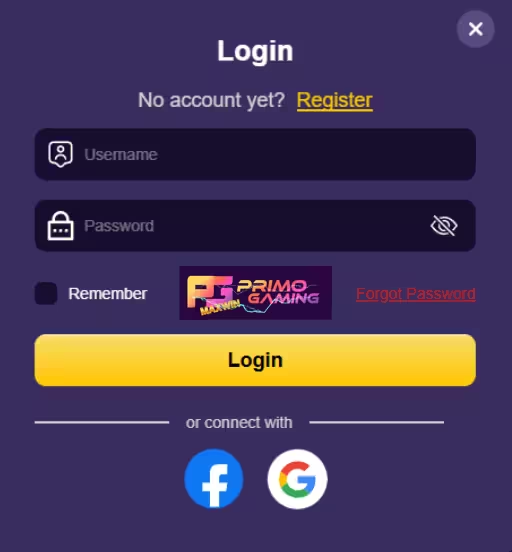
Logging in to Primo Gaming is designed to be quick, simple, and safe for every user. You don’t need complicated steps or technical knowledge—just your registered details and a few seconds to get inside your account.
The system is built to give you smooth access whether you are using a mobile phone, tablet, or computer. Every login goes through a secure process that helps protect your personal data, wallet, and game activity from unauthorized access.
At the same time, the platform keeps things easy so you don’t get stuck in long or confusing steps. From entering your details to reaching your dashboard, everything is made to feel fast and user-friendly.
This balance of simplicity and security ensures that every time you log in, your account is both easy to reach and fully protected.
Safe login is an important part of using PrimoGaming99 because it protects your account, personal details, and in-game activity every time you sign in.
When you log in safely, you make sure only you can access your wallet, game history, rewards, and settings. This reduces the risk of unauthorized access and helps keep your funds and data secure at all times. A secure login also builds trust in every session, so you can focus more on playing and less on security worries.
Safe access also improves your overall experience. It helps prevent common issues like login errors, account verification delays, and unexpected locks caused by suspicious activity. When you follow proper login steps, everything loads faster and works more smoothly across devices.
Whether you are using a mobile phone, tablet, or desktop, safe login habits ensure your account stays protected wherever you access it. This makes every session smoother, safer, and always ready when you need it.
Open your browser and go to the official website of PrimoGaming99.
Before doing anything else, confirm that you are on the correct page. The official site should clearly display the proper domain and platform branding.
This step matters because fake pages may try to look similar. Always avoid clicking random links from messages or ads.
Tip: Bookmark the official site so you can return easily next time without searching again.
On the homepage, look for the “Log In” button.
Tap or click it once to open the login form.
This will take you to a secure page where you can enter your account details safely.
Type your registered username or email address and your password.
Make sure everything is correct:
Even small mistakes can stop you from logging in successfully.
If you are on a personal device, you may enable “Remember Me” for faster future login. Do not use this option on shared devices for safety reasons.
Once your details are correct, tap Submit to continue.
After verification, you will be taken directly to your personal dashboard inside PrimoGaming99.
From here, you can:
This dashboard is your main control center for everything in your account.
Start playing now once you are inside.
If you cannot remember your password, recovery is simple and quick.
Follow these steps:
After that, you can log in again immediately.
Make sure your new password is strong. Use a mix of letters, numbers, and symbols to keep your account more secure.
Most players in the Philippines use mobile phones to access PrimoGaming99 because it is fast and convenient.
No app download is required. You can use your browser directly.
Steps are simple:
To make access easier, you can:
This lets you play anytime, whether at home, outside, or during short breaks.
Your account safety should always come first.
Follow these simple reminders every time you log in to PrimoGaming99:
These habits help protect your account and keep your gaming experience worry-free.
Login issues can happen from time to time, but most of them are easy to solve in just a few steps on PrimoGaming99. Before worrying, try these quick fixes to get back into your account.
Double-check your username and password. Make sure there are no extra spaces and that caps lock is turned off. If it still doesn’t work, use Forgot Password to reset it.
Refresh the page or close and reopen your browser. You can also try switching to another device or checking your internet connection.
If you entered incorrect details multiple times, your account may be temporarily locked for safety. Wait a few minutes before trying again.
Restart your phone or switch to a different network if the page is slow or not responding. This often fixes minor connection problems quickly.
If none of these work, you can contact support anytime for help.
Once you log in to PrimoGaming99, you unlock a full gaming experience designed for convenience and fun.
Inside your account, you will find:
Every login opens a new opportunity to enjoy more features and rewards.
If you are new, getting started is fast and simple:
After that, your account is ready for full access.
You can immediately explore games, bonuses, and features available on the platform.
Many players choose PrimoGaming99 because it is simple, secure, and easy to use.
Here is why users trust it:
Every login experience is designed to be smooth, secure, and beginner-friendly.
You’re only a few clicks away from your account on PrimoGaming99.
Log in anytime to pick up where you left off, check your balance, explore new games, and enjoy everything your account has to offer. The process is fast, simple, and built for smooth access whether you’re on mobile or desktop.
If you forget your password, recovery is quick and straightforward so you can get back in without long delays. And if anything feels unclear or doesn’t work as expected, the support team is always available to assist you.
Everything is designed to keep your login experience easy, secure, and stress-free every time you return.
Go to the official site of PrimoGaming99, click Log In, then enter your username and password to access your account.
Click Forgot Password on the login page, enter your registered email or mobile number, then follow the reset instructions sent to you.
This usually happens due to wrong credentials, weak internet connection, or temporary account lock after multiple failed attempts.
Yes. The platform uses security checks like encryption and OTP verification to help protect your account.
Yes. You can log in using any mobile browser. The system is fully optimized for smartphones and tablets.
Check your signal, spam folder, or wait a few minutes and request a new code if needed.
You can reach customer support through live chat or email for quick assistance with login or account issues.